
Introduction
Over the past several months, I’ve observed a parade of enterprise AI assistants promising to be productivity miracles. Most are just ChatGPT with a branded wrapper and a corporate login screen.
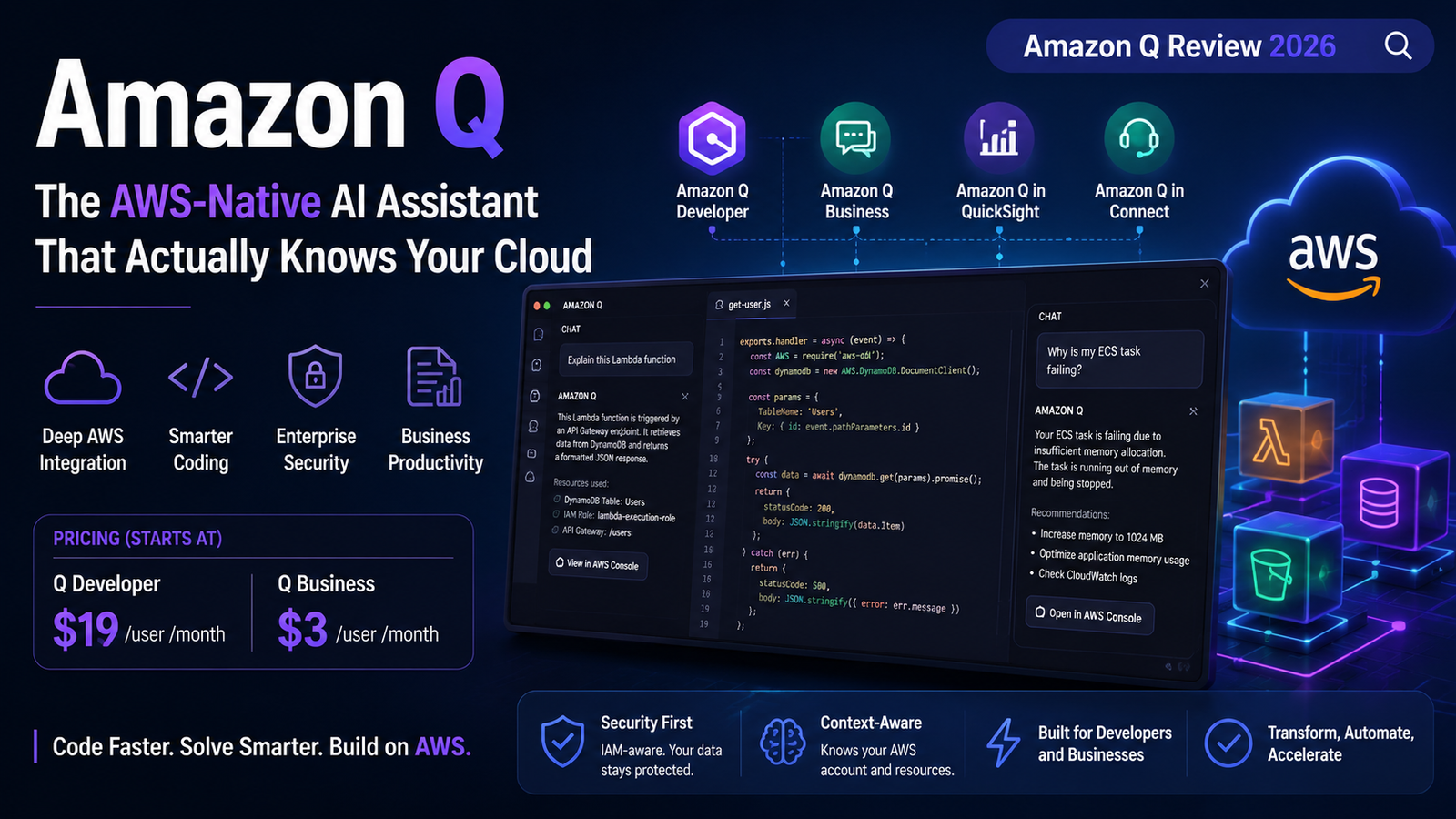
Amazon Q is different. Not because it’s smarter—it isn’t, not always—but because it actually knows where it lives. When you ask Amazon Q about an IAM policy, it doesn’t guess. It queries your actual AWS account. When you ask about a failing Lambda, it references your real service configuration, not some generic example from the documentation. That contextual awareness is what separates Q from the general-purpose chatbots flooding the enterprise market.
However, Q also has a complicated relationship with trust. A supply chain attack in July 2025 injected malicious code into its VS Code extension. A year later, a high-severity flaw (CVSS 8.5) allowed malicious repositories to automatically execute code and steal AWS credentials. The same assistant that can transform your codebase can, if not properly managed, become a vector for credential theft.
Let’s cut through the marketing and analyze what Amazon Q actually does, where it excels, where it falls short, and whether it’s the right tool for your team.
What Amazon Q Actually Is (And Isn’t)
Amazon Q is AWS’s generative AI assistant, launched in November 2023 and significantly expanded since. But that description undersells it.
Think of Q as two distinct products wearing the same name:
Amazon Q Developer is for people who write code. It replaces AWS CodeWhisperer (which was sunset in late 2025) and lives inside VS Code, JetBrains IDEs, Visual Studio, Eclipse, and the command line. It provides inline completions, chat-based assistance, security scanning, and—most distinctively—automated code transformations like upgrading Java 8 to Java 17.
Amazon Q Business is for everyone else. It connects to your enterprise data sources—Confluence, Jira, SharePoint, S3, Salesforce—and answers questions grounded in your actual internal documents. It’s a permissions-aware knowledge assistant designed to reduce hallucinations about your internal policies.
Amazon Q in QuickSight and Amazon Q in Connect are specialized versions for business intelligence and contact centers, with their own pricing models.
Confused yet? You’re not alone. AWS’s branding here is a mess. But the underlying technology is more interesting than the naming suggests.
The AWS Integration: Where Q Actually Wins
Here’s the thing about most AI coding assistants: they guess.
GitHub Copilot guesses at your infrastructure from whatever you paste into the prompt. Cursor guesses based on your open files. They’re working with incomplete information.
Amazon Q doesn’t guess. It queries.
What this means in practice: Ask Q to draft an IAM policy, and it scopes to resources that actually exist in your account rather than inventing ARNs. Ask why an ECS task is failing, and it references your actual service configuration. In the AWS console, it can debug a Lambda function against the stack you’re looking at.
For an engineer who spends their day in the AWS console and Terraform, this removes a lot of copy-paste and a lot of confidently-wrong answers about services that don’t exist in your region.
The transformation feature is another standout. Q can take a Java 8 or 11 codebase and upgrade it toward Java 17, fixing deprecated APIs and dependency versions as it goes. It has a separate path for porting .NET Framework code to cross-platform .NET.
But—and this is important—the transformation feature is scoped, not magic. It handles dependency bumps and deprecated-API rewrites well. It does not redesign architecture or resolve every test failure. Treat the output as a reviewed pull request from a fast junior engineer, not a finished migration. Run your full test suite before trusting it.
The Pricing Reality
Amazon Q’s pricing is more fragmented than it needs to be.
| Product | Tier | Price | What You Get |
|---|---|---|---|
| Q Developer | Free | $0 | 50 agentic requests/month, 1,000 lines of code transformation |
| Q Developer | Pro | $19/user/month | 1,000 agentic requests, 4,000 lines transformation, IP indemnity |
| Q Business | Lite | $3/user/month | Document Q&A, basic content creation |
| Q Business | Pro | $20/user/month | Full document actions, 100+ enterprise connectors |
The catch with Q Developer Pro: There’s no trial period. You either stay on the free tier’s 50 requests a month, or commit to $19/user/month to find out if the unlimited tier is worth it.
For context, GitHub Copilot Pro is $10/month for individuals and $19/user/month for business. Amazon Q Developer Pro at $19/month sits at the same price point as Copilot Business but without the free trial.
Q Business Pro at $20/user/month undercuts Microsoft 365 Copilot and Gemini Enterprise, which both price around $30/user/month. If you’re already in the AWS ecosystem, that’s a meaningful saving.
The Security Record: Two Incidents You Need to Know About
This is where things get uncomfortable. And unlike some reviewers, I’m not going to gloss over it.
Incident 1: CVE-2025-8217 (July 2025)
A hacker submitted a pull request to the GitHub repository for the Amazon Q Developer VS Code extension. The malicious code was designed to call the Q Developer CLI and, if successful, could have deleted the user’s home directory.
The attack succeeded because of an inappropriately scoped GitHub token in AWS CodeBuild. The malicious code was distributed with extension version 1.84.0 but failed to execute due to a syntax error. AWS removed version 1.84.0 and released 1.85.0.
The honest take: This was a supply chain attack that reached users’ systems automatically. It failed to execute only because of a coding error by the attacker. The next attack might not be so clumsy.
Incident 2: CVE-2026-12957 and CVE-2026-12958 (June 2026)
Two high-severity vulnerabilities were identified in the Language Servers for AWS, which power Amazon Q Developer across all IDE plugins.
- CVE-2026-12957 (CVSS 4.0 score: 8.5): An improper trust boundary enforcement issue allowed a malicious repository to automatically execute commands when a developer opened the workspace—no clicks, no warnings. Researchers from Wiz Research demonstrated that a single config file in a repo was enough to go from
git cloneto cloud compromise. - CVE-2026-12958: A missing symlink check that could allow arbitrary file writes outside the workspace trust boundary.
Both issues affect Amazon Q Developer IDE plugins for Visual Studio Code, JetBrains, Eclipse, and Visual Studio. AWS patched them in Language Servers for AWS version 1.69.0.
What this means for you: If you’re using Amazon Q Developer, you need to stay current on updates. Auto-updates handle this for most users, but if your network configuration blocks them, you’re exposed. CISOs should confirm that affected IDE plugins and the language server have updated.
Where Q Falls Short
Let’s be balanced about this.
Code completion quality lags behind competitors. Based on comparative analyses, Amazon Q’s raw suggestion quality doesn’t consistently match Copilot or Cursor. It offers better latency—responsiveness is actually good—but the suggestions aren’t as strong.
It struggles with complex problems in large codebases. While Q’s project-wide context is an improvement over CodeWhisperer, users report difficulty with multi-layered problems in large code bases. The application logs users out automatically, causing loss of chat history.
It’s near-useless outside AWS. This is the tradeoff. Tools like GitHub Copilot and Cursor are excellent generalists—they know syntax and common patterns across every language and framework. Amazon Q trades breadth for depth in one specific area: AWS itself. If you’re primarily on GCP or Azure, it’s not the right tool.
Hallucination is still a problem. Like all LLM-based tools, Q frequently hallucinates or provides incorrect information. The user experience isn’t as smooth as competitor products.
Enterprise integration setup can take a full week. This isn’t a five-minute install.
Amazon Q vs The Competition
Here’s how Q stacks up against the main alternatives in 2026:
| Tool | Best For | Price (Pro) | Key Limitation |
|---|---|---|---|
| Amazon Q Developer | AWS-native teams | $19/user/mo | Weak outside AWS |
| GitHub Copilot | General coding | $10-19/user/mo | Limited AWS context |
| Cursor | Deep codebase awareness | $20/user/mo | No AWS integration |
| Claude Code | General engineering | Variable | No AWS integration |
According to market data, GitHub Copilot remains the IDE standard, while Cursor leads in multi-file context, and Amazon Q excels in AWS environments.
The Amazon Q vs Claude Code comparison is particularly interesting because Q can actually run Claude via Bedrock. The real difference is the surrounding product: AWS integration versus a general, model-leading terminal agent. Q meets you inside AWS; Claude Code meets you in any terminal with the latest Anthropic model.
For AWS-heavy teams, Q wins. For general-purpose engineering, Claude Code or Copilot wins.
Who Should Actually Use Amazon Q
Use Amazon Q if:
- Your team runs significant workloads on AWS and you want an assistant that understands your actual cloud architecture, not generic patterns
- You’re doing Java version migrations—the automated upgrade feature saves weeks of manual work
- You need FedRAMP, HIPAA, or data residency guarantees
- You want an assistant that connects to your Confluence, Jira, and S3 for answers grounded in your internal docs
Skip Amazon Q if:
- You’re on GCP, Azure, or don’t have heavy AWS usage
- You need the strongest general-purpose code completion (Copilot and Cursor are better)
- You’re not willing to stay current on security updates
- You need a quick trial to evaluate—Q Developer Pro has none
The Verdict
Amazon Q is the most capable AI assistant for teams that live inside the AWS ecosystem. Period.
Its deep integration with AWS accounts, services, and documentation is genuinely differentiated. The automated Java upgrades and code transformations are features no competitor matches at this level. The $19/user/month pricing is competitive, especially for Q Business at $20/user/month against Microsoft and Google’s $30/user/month offerings.
But Q is not a general-purpose coding assistant. If you’re not deeply invested in AWS, you’re paying for capabilities you won’t use while getting weaker suggestions than Copilot or Cursor.
The security track record is concerning. Two significant vulnerabilities in a year—one a supply chain attack, one a credential theft vector—suggest that AWS needs to tighten its development and review processes. The fixes are out, but the pattern is worth watching.
Bottom line: If your team breathes AWS, Q is a no-brainer. If you’re writing generic application code with no cloud in sight, there are better options.
FAQs
1. What is Amazon Q?
Answer: Amazon Q is AWS’s generative AI assistant, available in two main versions: Q Developer for coding and cloud operations, and Q Business for enterprise knowledge search and productivity. It’s built on Amazon Bedrock and can use multiple foundation models including Amazon Titan and Anthropic’s Claude.
2. How much does Amazon Q cost?
Answer: Q Developer has a free tier (50 agentic requests/month) and Pro at $19/user/month. Q Business Lite is $3/user/month, and Q Business Pro is $20/user/month. There’s no trial for Q Developer Pro.
3. Is Amazon Q better than GitHub Copilot?
Answer: For AWS-native teams, yes—Q understands your actual AWS account and services. For general coding, Copilot is stronger with broader IDE support and better suggestions. Choose based on your primary environment.
4. Is Amazon Q secure?
Answer: Q has had two significant security incidents: a supply chain attack in July 2025 (CVE-2025-8217) and credential theft vulnerabilities in June 2026 (CVE-2026-12957, CVSS 8.5). Both were patched. Stay current on updates.
5. Does Amazon Q work outside AWS?
Answer: Poorly. Q’s core strength is AWS integration—it’s “near-useless outside AWS”. For GCP or Azure users, other tools are better.
6. What’s the difference between Amazon Q and Amazon Quick?
Answer: Amazon Quick is the agentic evolution launched in late 2025. It runs continuously, indexes your files, and proactively orchestrates work. Think of it as Q Business with agentic capabilities.
Key Takeaways
- Amazon Q is AWS-native. It queries your actual account, not generic training data.
- Two products, one name. Q Developer is for coding; Q Business is for enterprise knowledge work.
- The Java upgrade feature is genuinely unique. No competitor does this as well.
- Security requires vigilance. Two incidents in a year—stay updated.
- Price is competitive. $19-20/user/month undercuts Microsoft and Google.
- Not for everyone. If you’re not on AWS, skip it.
Related reading: Microsoft Copilot: Complete Guide 2026 | GitHub Copilot: What Developers Need to Know | 10 Free AI Tools for 2026 | The Future of AI Security
For regular updates about the AI, AI tools, AI guides, technology & more. Visit, The TechUnfoldedAi.com.
Leave a Reply